




**radiogrit.js** makes any audio sound like it came off a real **AM or FM radio**: not just a band-limiting filter, but the
whole bag of things a receiver does to a signal. Mains hum and power-line buzz, heterodyne whistles, slow skywave fades
that turn raspy as the dial drifts, lightning static, crackle, FM picket-fence nulls where the stereo collapses to mono,
antenna fizz and knocks, a power drill somewhere on the grid, the 15 kHz ceiling and the 19 kHz pilot. It is plain
sample-by-sample DSP on `Float32Array`s: no Web Audio, no WebAssembly, no dependencies, no DOM. It runs in a page, in a
Worker, in an Android WebView or in Node, and it is **deterministic**: the same input, mode and seed always give the same
samples.
> [!IMPORTANT]
> This is a **character simulation**, not a model of a particular receiver or of radio propagation. The filters, levels and
> event timings were tuned by ear to sound like radio, and we have **not** compared the output with recordings from real
> radios or run a listening test. See [Known limits](#known-limits) and [What we did and did not measure](#numbers-what-we-measured).
**Try it live:** [demo](https://dialersapps.github.io/radiogrit/demo.html) (process your own audio in the browser) · [tests](https://dialersapps.github.io/radiogrit/test.html)
**Contents:** [Why](#why) · [Quick start](#use) · [API](#api) · [How it works](#how-it-works) · [What it does, in pictures](#what-it-does-in-pictures) · [Numbers](#numbers-what-we-measured) · [Tests](#tests) · [Limits](#known-limits) · [Licence](#licence)
## Why
A radio is a bundle of small, specific failures, and each one has a sound people recognise. AM has a steep top-end wall, a
rasp in the mids, a hum from the mains and a carrier that fades in and out as the ionosphere moves. FM is wide and clean
until multipath hits it: then the programme dips in fast picket-fence nulls, hiss splashes in, and the stereo image
collapses toward mono. We built an AM/FM effect for a radio-style web and Android app, tuned it by ear on the Web Audio
graph, and then rewrote it as plain DSP so it runs anywhere JavaScript does and gives the same result every time. We are
releasing that version.
When we looked, we did not find a small, dependency-free JavaScript library that simulates AM and FM *reception* (as
opposed to generic lo-fi, vinyl-crackle or telephone filters), so here it is.
| | radiogrit.js |
|---|---|
| Ships as | one .js file (12.3 KB gzipped) plus an identical ES module |
| Loading | plain script, ES module or `require()`; nothing to fetch |
| Input | one or two `Float32Array` (or `Int16Array`) channels, sample rate 8 to 192 kHz |
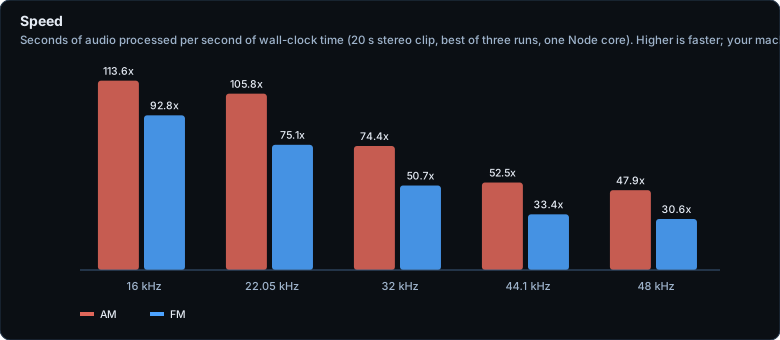
| Speed (our PC, one core) | AM about 48x real time, FM about 31x, at 48 kHz stereo; faster at lower rates |
| Deterministic | yes: same input + mode + seed = same samples (on one JavaScript engine) |
| Every feature switchable | yes, and switching one off never changes what the others do |
## Use
```html
```
ES module (`radiogrit.mjs`, same code):
```js
import radiogrit from "./radiogrit.mjs"; // or: import { process } from "./radiogrit.mjs";
```
Node / CommonJS: `const radiogrit = require("./radiogrit.js");`
Play the result with Web Audio:
```js
const buf = audioCtx.createBuffer(out.channels.length, out.channels[0].length, out.sampleRate);
out.channels.forEach((c, i) => buf.copyToChannel(c, i));
const src = audioCtx.createBufferSource(); src.buffer = buf; src.connect(audioCtx.destination); src.start();
```
Try it without writing code: serve this folder with any static server and open [`demo.html`](demo.html) (or use the
[hosted demo](https://dialersapps.github.io/radiogrit/demo.html)), then pick a recording of your own. Nothing is uploaded.
## API
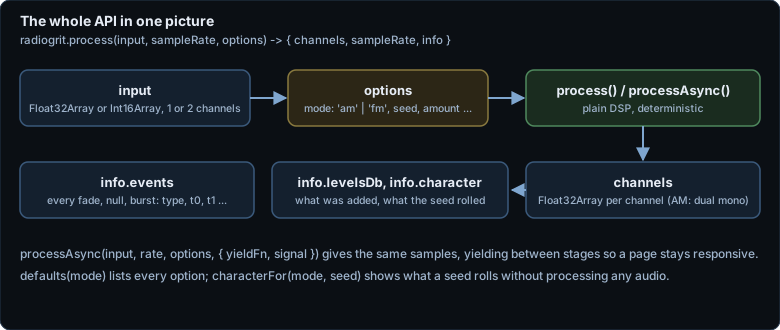
`radiogrit.process(input, sampleRate, options)` returns `{ channels, sampleRate, info }` synchronously.
`radiogrit.processAsync(input, sampleRate, options, hooks?)` returns a Promise of the same, yielding between stages.
- `input`: a `Float32Array` or `Int16Array`, or an array of one or two of them (equal length; your arrays are never modified).
- `sampleRate`: 8000 to 192000. Anything else throws.
- `hooks.yieldFn`: async function awaited between stages (default `setTimeout 0`), so a long clip does not freeze a page.
- `hooks.signal`: any object with an `aborted` property (an `AbortSignal` works). If it turns `true` the promise rejects with an `AbortError`.
- Other exports: `radiogrit.version`, `radiogrit.defaults(mode)` (every option and feature switch) and
`radiogrit.characterFor(mode, seed)` (what a seed rolls, without processing audio).
### Options
| Option | Default | What it does |
|---|---|---|
| `mode` | (required) | `"am"` or `"fm"` |
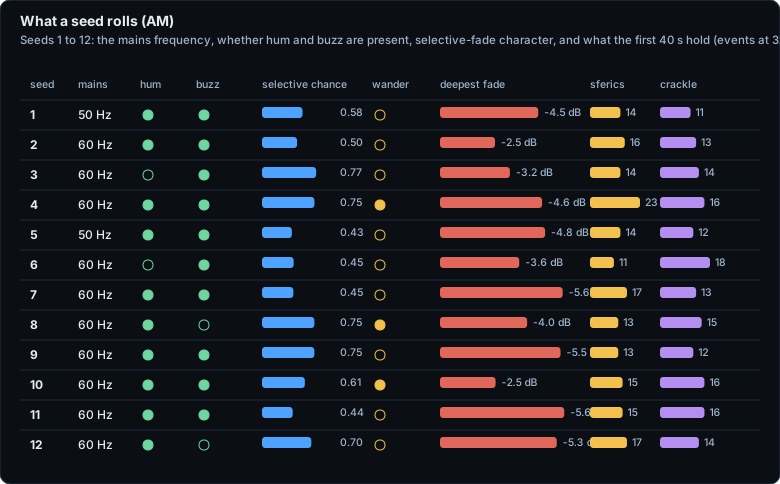
| `seed` | 1 | Picks the radio's personality: mains frequency, which interference is present, and when every event happens |
| `amount` | 1 | Scales the whole noise bed (0 to 4); 0 leaves only the programme path |
| `eventRate` | 1 | Scales how often scheduled events happen (0.05 to 50). Short clips need a higher value to contain any, see [limits](#known-limits) |
| `features` | all on | An object of switches, see below. Switching one off leaves every other component untouched |
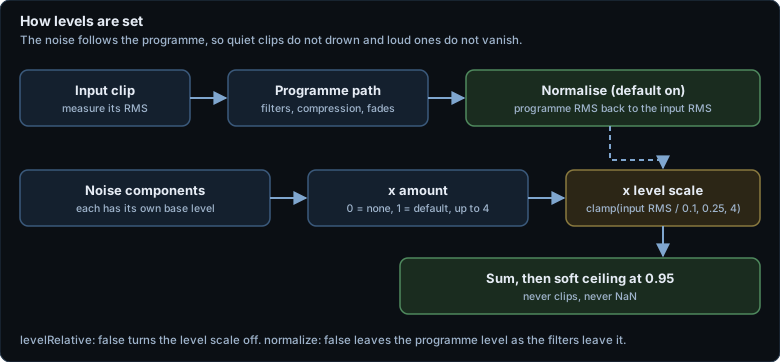
| `normalize` | true | Bring the programme path back to the input's RMS level |
| `levelRelative` | true | Scale the noise bed by the input level (clamped 0.25x to 4x), so quiet clips get quiet noise |
| `mono` | false | Return one channel (FM: mid of the stereo result) |
| `debug` | false | Also return the programme path, the noise bed and the gain envelopes in `info.debug` (used for the figures here) |
**AM features:** `hum`, `buzz`, `hiss`, `heterodyne`, `crackle`, `sferics`, `selectiveFade`, `flutter`.
**FM features:** `hiss`, `multipath` (picket fence, antenna fizz, antenna knock and the hiss splash they bring), `crackle`,
`powerToolRfi`, `stereoSeparation`, `ceilingWhistle`, `pilot`, `flutter`.
### What comes back
`info` holds `mode`, `seed`, `durationSec`, the `features` used, `normGain`, `levelScale`, `character` (for AM: the mains frequency and
whether hum, buzz and wandering tuning were rolled), `levelsDb` (the level of each component) and **`events`**: every scheduled thing, as
`{ type, t0, t1, ... }`. Types are `carrierFade` (with `floor` and `selective`), `sferic`, `crackleBurst`, `electricalTone`, `picketFence`
(with `floor`), `antennaFizz`, `antennaKnock`, `multipathRasp` and `powerTool`. That makes it easy to line visuals up with the interference.
## How it works
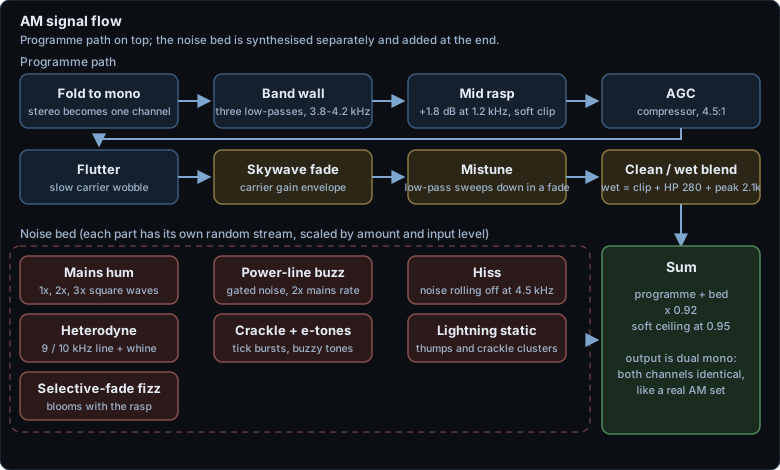
Two receiver models, each a **programme path** (your audio through the receiver's filters, compression and fades) plus a **noise bed**
synthesised separately and added at the end.
**AM** folds to mono, then three low-passes make a steep wall near 4 kHz. A mid bump and a soft clip add rasp; an AGC compressor tames
the level. A slow flutter and the skywave fade envelope ride on the carrier. In a *selective* fade the tuning drifts down (a low-pass
sweeps), a distorted copy of the programme blends in, and a fizz blooms, which is the sound of a real fade turning ugly. The bed adds hum,
buzz, hiss, a heterodyne whistle at 9 or 10 kHz plus a slow whine, crackle, lightning static and the fizz.
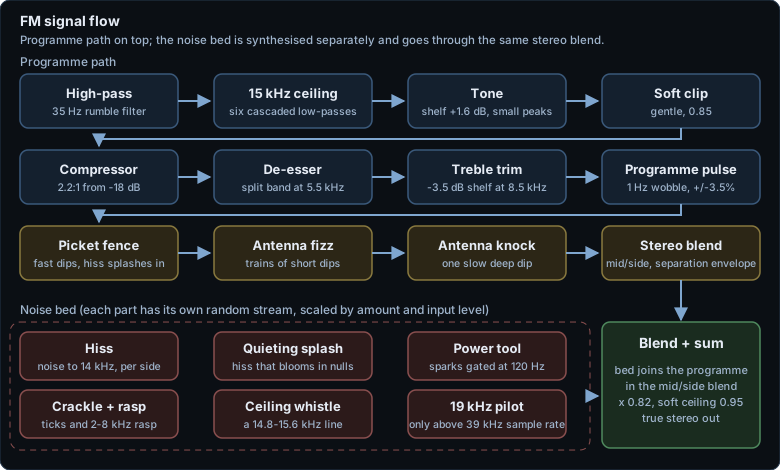
**FM** is wider: a 35 Hz high-pass, a 15 kHz ceiling made of six cascaded low-passes, a little tone shaping, a soft clip, a compressor
and a split-band de-esser. A 1 Hz pulse wobbles the level. Then the multipath: picket-fence dips, antenna fizz, antenna knocks, and a
mid/side stereo blend whose separation collapses toward mono in the same places. The bed (hiss, quieting splash, power-tool sparks,
crackle and rasp, a thin whistle near 15 kHz and the 19 kHz pilot) goes through the same blend.
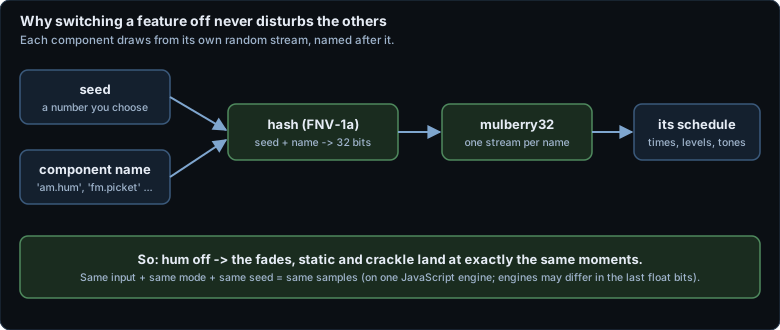
Two design choices matter for how you use it. **Each component has its own random stream**, named after it and seeded from your seed, so
switching hum off never moves a single fade or crackle:
And **levels follow the programme**, so quiet clips do not drown in noise and loud ones do not lose it:
## What it does, in pictures
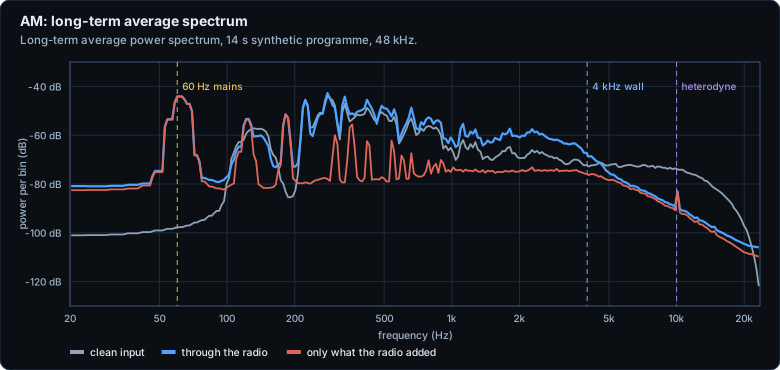
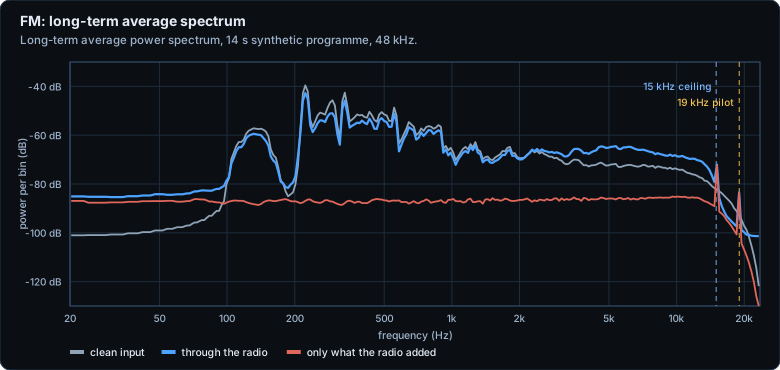
**Everything below was measured or drawn from a synthetic, seeded programme** (a formant voice plus a wide-stereo pad, see
[`tools/measure.mjs`](tools/measure.mjs)) and is reproducible with `npm run measure`. The first two figures are the whole story in
one glance: a clean programme, the same programme through the radio, and only what the radio added.
### AM and FM spectrograms
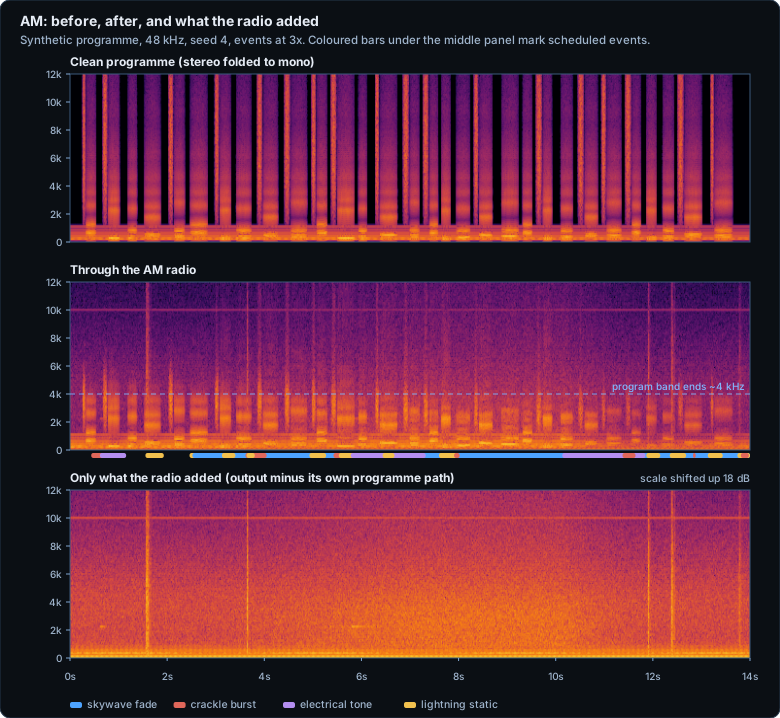
Above the 4 kHz wall in the middle panel there is no programme at all, only the bed: hiss, the 10 kHz heterodyne line, and the
vertical stripes of lightning static and crackle. The coloured bars mark the scheduled events.
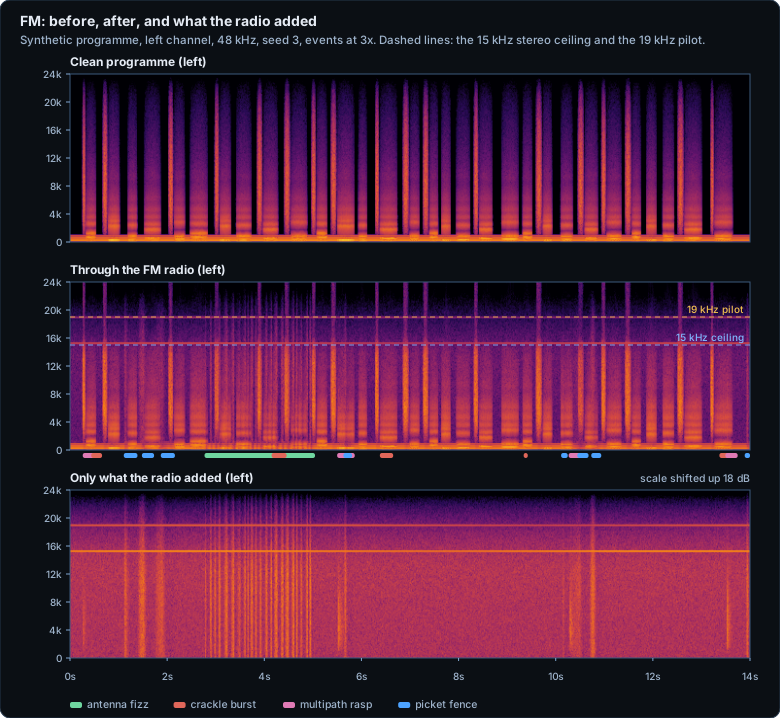
FM keeps the programme to 15 kHz. The green bar around 3 to 5 s is an antenna-fizz train (the picket-fence comb of dips in the
spectrogram), and the bright horizontal lines in the bottom panel are the ceiling whistle and the 19 kHz pilot.
### The ingredients, one at a time
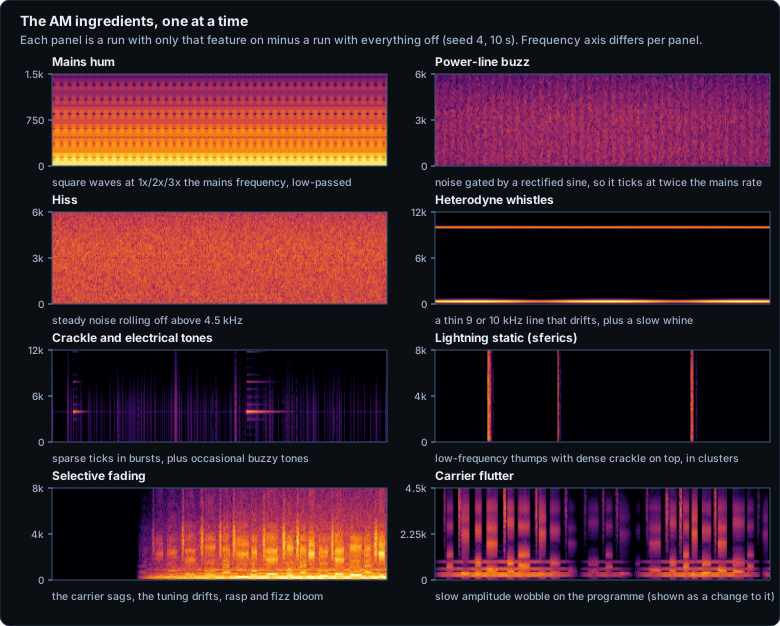
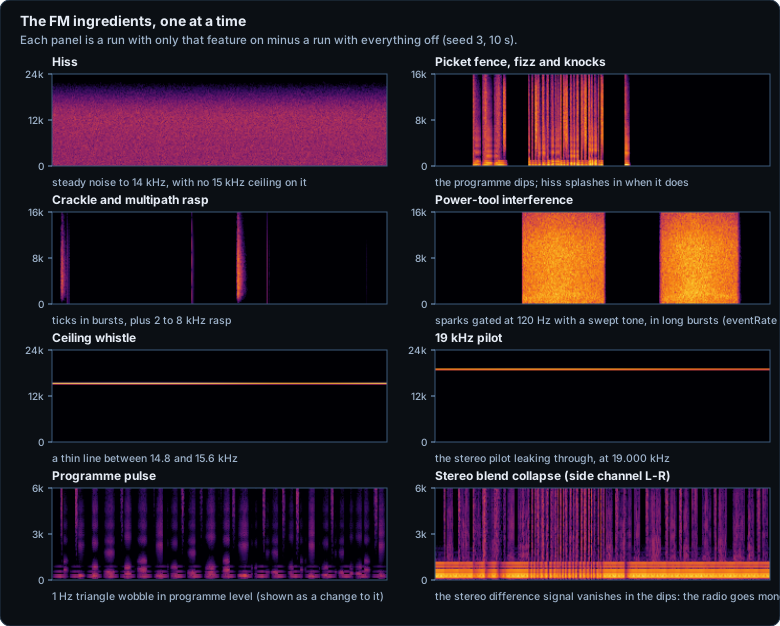
Each panel is a run with only that feature on, minus a run with everything off, so you can see what each part contributes.
### The programme path
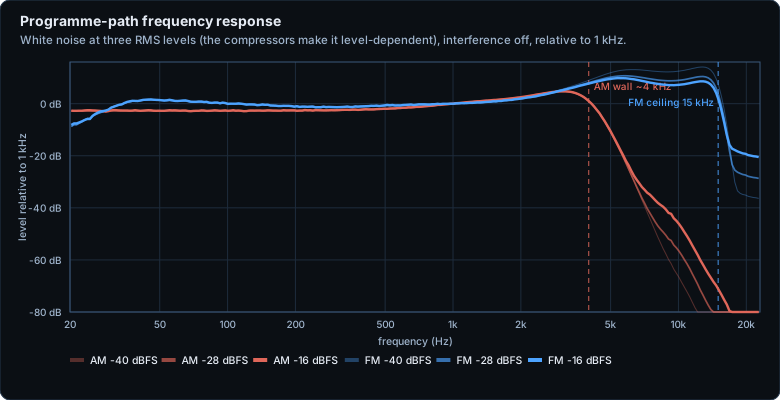
The AM path is a wall: with white noise at -28 dBFS it passes the 1 kHz level down to about 4.5 kHz and is 20 dB below it by
about 5.7 kHz. The FM path runs to a ceiling near 16 kHz. Both depend on level, because both have compressors and soft clips:
louder input fills in above the FM ceiling with clipper harmonics (the 20 dB crossing moves from 17.3 kHz at -28 dBFS to 21.5 kHz
at -16 dBFS). The FM path also lifts the 5 to 15 kHz region by roughly 10 dB over the 1 kHz level on this noise; we have not
isolated which stage causes that.
### Events: fades, nulls, and the stereo image
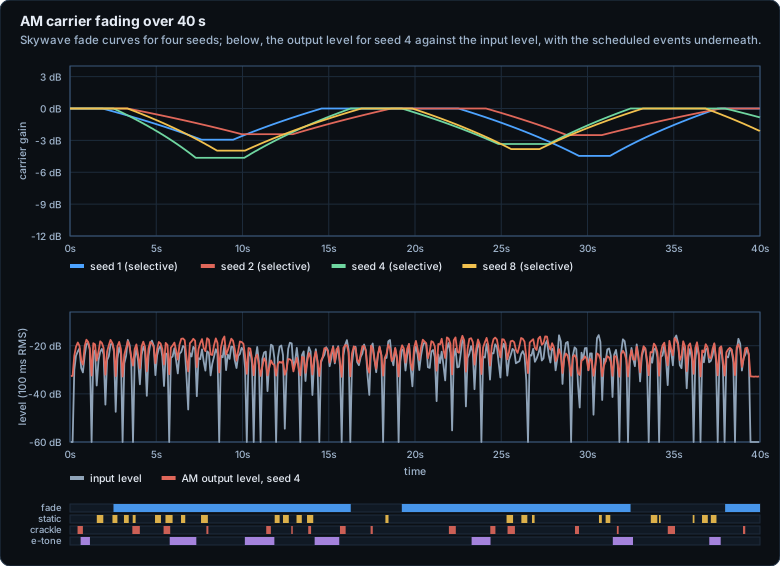
The skywave fade in this build is gentle: in our 12-seed, 40 s runs the carrier sagged between 2.5 and 5.6 dB at its deepest. What makes a fade
*sound* like a fade is the selective part (mistuning, rasp, fizz), not the level change.
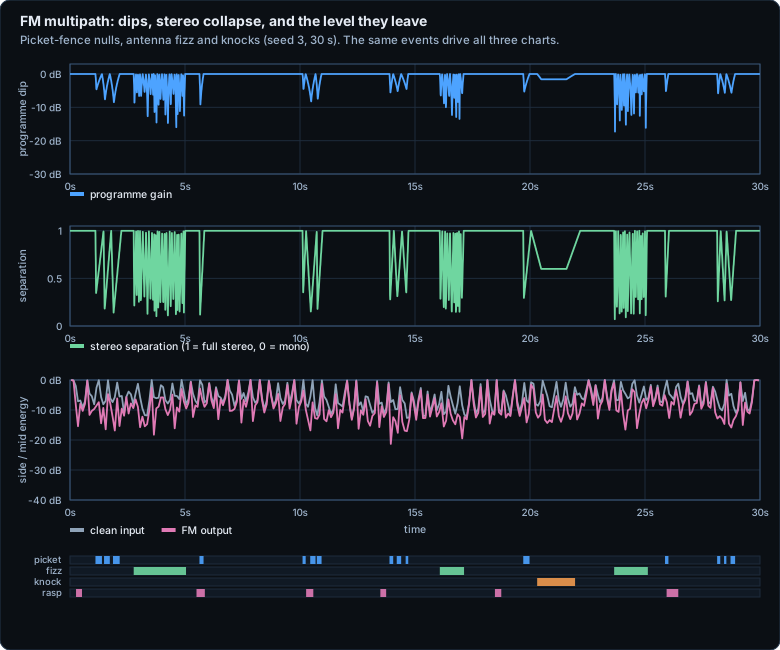
In this run the programme dipped by as much as 18 dB, the separation fell as low as 0.07 (almost mono), and the output's side-to-mid
energy ratio fell as low as -21 dB, against a median of -6 dB in the clean input.
### What each ingredient sounds like up close
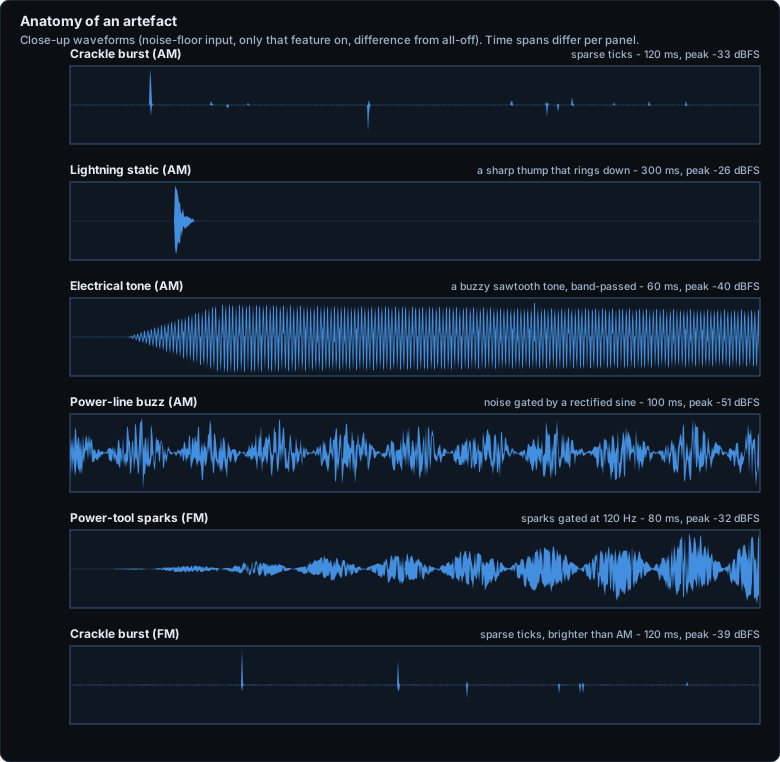
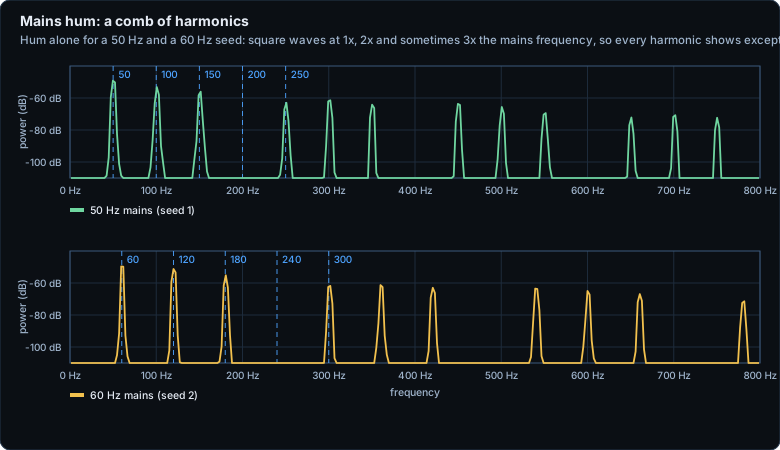
The hum is a square wave at 1x and 2x the mains frequency (3x on some seeds) through a low-pass, so every harmonic appears
except multiples of four.
### How loud things are
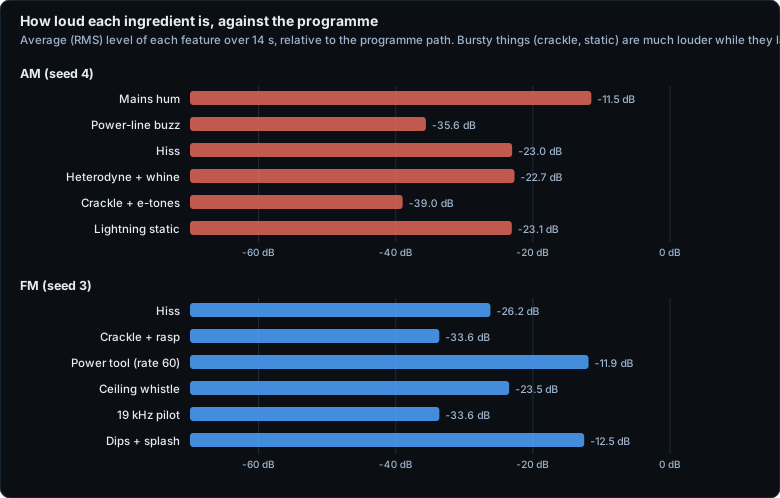
These are RMS averages over 14 s; bursty ingredients are far louder while they last. **Mains hum is the loudest single ingredient** when a seed
rolls it (-11.5 dB against the programme for this seed), so switch `hum` off or lower `amount` if it is too much. The FM power tool is
shown at `eventRate: 60` because at the default rate the first tool turns on 45 to 180 seconds into a clip.
### Seeds, dials and speed
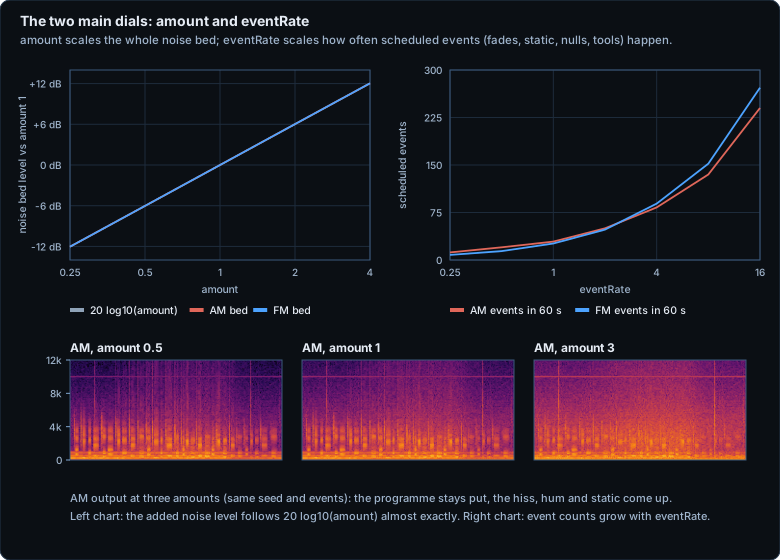
The added noise level follows `20 log10(amount)` to within 0.01 dB for both modes, from amount 0.25 to 4 (the lines in the left chart sit on the ideal), and event counts
grow with `eventRate`, a little less than proportionally at the top.
## Numbers (what we measured)
All of it on a synthetic, seeded signal in Node 24 on one Windows PC; reproduce with `npm run measure`. **We have not run a listening test, have not
measured real speech or music, and have not compared the output with real radios.** The numbers check that the code does what it says; judge the
sound by ear with [`demo.html`](demo.html).
| What | Result |
|---|---|
| AM programme path | -3 dB re 1 kHz at about 4.5 kHz, -20 dB at about 5.7 kHz (white noise, -28 dBFS) |
| FM programme path | passes the 1 kHz level near 16 kHz; clipper harmonics fill in above it at high input levels |
| Hum | peaks at the mains frequency and harmonics (50 or 60 Hz), none at multiples of four |
| Heterodyne | a narrow line at 9 or 10 kHz (rolled per seed) |
| FM pilot | present at 19.000 kHz at 48 kHz sampling; skipped at 32 kHz, where it would be above Nyquist |
| Amount | noise bed level follows 20 log10(amount) to within 0.01 dB (amount 0.25 to 4, both modes) |
| Determinism | same input + mode + seed gives identical samples; Node 24 and Chromium gave the same regression hashes |
| Speed (20 s stereo, best of 3) | AM 47.9x, FM 30.6x real time at 48 kHz; AM 113.6x, FM 92.8x at 16 kHz |
| Size | `radiogrit.js` about 38 KB with licence and comments, 12.3 KB gzipped |
## Tests
Serve this folder with any static server and open [`test.html`](test.html), or run `npm test` (Node 18 or later). Both run the same 59 checks on
seeded synthetic signals: output shape and length, finite samples and no clipping, determinism, a different seed giving different samples,
input never modified, `Int16` input, mono output, event schedules and `eventRate`, `amount` scaling the bed linearly, silence staying silent with
every feature off, the AM wall and the FM ceiling on white noise, dual-mono AM, the AM hum, heterodyne and independent random streams, FM stereo
behaviour, separation and the picket-fence dips, the 19 kHz pilot and the ceiling whistle (and their absence at low sample rates), level following,
sample rates from 16 to 96 kHz, `processAsync` matching `process`, `yieldFn` and `AbortSignal`, error cases, and regression hashes. `test.html`
also checks the ES module build against the script build. All passed at the time of writing in Node 24 and Chromium.
## Known limits
- **A character simulation.** It is tuned to sound like radio. It does not model a specific receiver, antenna, band or propagation path, and we have not compared it with recordings of real radios.
- **Not sample-identical to our earlier Web Audio version.** This is a fresh sample-domain implementation of the same character; we did not measure how far it differs from that version.
- **Offline, whole clip in memory.** There is no streaming or block-by-block API. `processAsync` only yields between stages.
- **Short clips may get few events.** Events are scheduled over the clip's length, and some start late (the first FM power tool is 45 to 180 s in at `eventRate: 1`). Raise `eventRate` for short clips.
- **Hum can be loud.** On seeds that roll it, hum is the strongest ingredient; use `features.hum: false` or a lower `amount`.
- **Sample-rate limits.** 8 to 192 kHz. The FM ceiling whistle needs more than 32 kHz and the pilot more than 39 kHz; below that they are skipped.
- **Two channels at most.** Extra channels are ignored. AM always returns identical (dual-mono) channels.
- **Tested in Node 24 and Chromium only** (both V8). We have not checked that other engines give bit-identical samples; floating-point last bits may differ.
- **Measured only on synthetic signals** (see above), with no listening test.
- "AM" and "FM" are generic terms here; this project is not affiliated with any broadcaster or radio manufacturer.
## Where the code comes from
radiogrit.js was written by Dialer's Apps. The filter shapes, levels and event timings follow what we tuned by ear for an earlier AM/FM effect built on the
Web Audio graph in our own apps; this is a fresh implementation as plain sample-by-sample DSP, and it contains no code copied from another project.
## Licence
MIT, see [`LICENSE`](LICENSE). Copyright (c) 2026 Dialer's Apps.
Made by [Dialer's Apps](https://dialersapps.pages.dev/). Read the story behind it in the
[blog post](https://dialersapps.pages.dev/lab/notes/radiogrit.html).